Virtual Filesystem
The virtual filesystem (VFS) gives patches stable paths for embedded source files, uploads, linked files, and other assets.
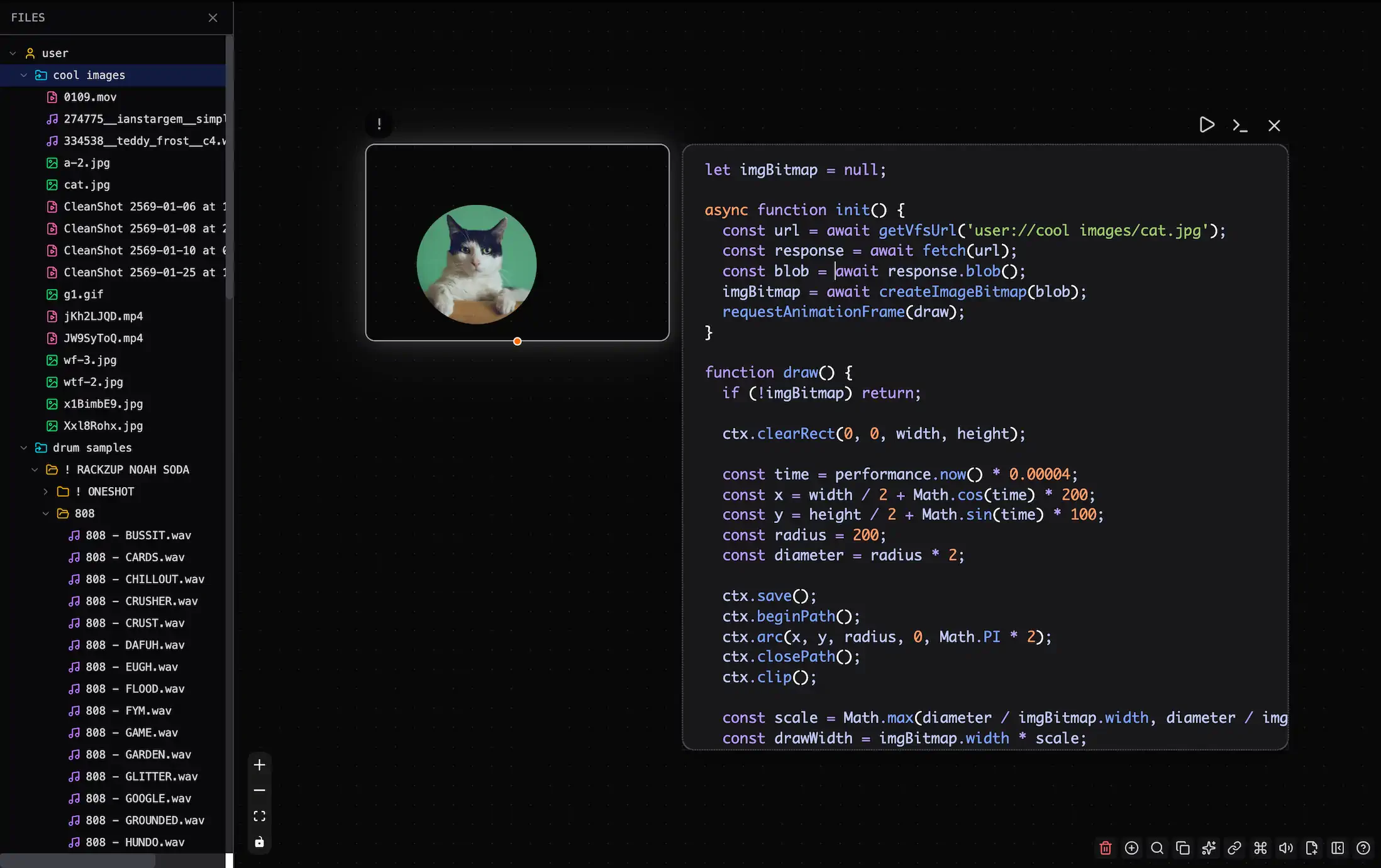
This VFS includes assets for a canvas demo. Add a file to the patch or link it from your local system.
Managing Files
Use the sidebar to manage patch files. Open it with Ctrl/Cmd + B > Files. You can also click "Open Sidebar" at the bottom right.
See Files for file management details.
Patch and User Files
The namespace tells you who owns a file and whether it travels with the patch:
| Namespace | Use it for | Embedded in the patch | Files sidebar editor |
|---|---|---|---|
patch:// |
Small source files owned by the patch | Yes | GLSL files editable |
user:// |
Uploads, browser-local files, linked folders | No | Read-only |
Use patch:// for a GLSL utility that should work when someone else opens your patch. Use user:// for personal files and larger assets that live outside the patch, such as samples, videos, or a linked project folder.
Important: A linked
user://file may need permission again after you reopen the patch. Apatch://file needs no external permission.
GLSL Includes
Relative GLSL includes resolve from patch://, so these two paths select the same file from a shader node:
#include "./shaders/noise.glsl"
#include "patch://shaders/noise.glsl"
Use an explicit User path to include a linked or uploaded file:
#include "user://my-shaders/noise.glsl"
See GLSL Imports for supported shader objects, nested includes, and examples.
Loading Files in Code
Use await vfs.getUrl(path) to get the URL for a VFS file. Relative paths use the user:// namespace:
// In p5:
let img;

async function setup() {
  let url = await vfs.getUrl("./photo.jpg");
  img = await loadImage(url);
}

// In js or canvas.dom:
const data = await vfs.get("user://data.json").json();
VFS paths use the user:// prefix for uploaded files. Patchies clears object URLs when it destroys the object.
Relative paths in the JavaScript vfs API continue to resolve from user://. Use an explicit patch:// path to read an embedded Patch file:
const source = await vfs.get("patch://shaders/noise.glsl").text();
This differs from GLSL #include, where relative paths resolve from patch://.
Browsing Files in Code
Use vfs.list() to inspect one folder level at a time. Use vfs.search() to find matching entries anywhere below a folder. Both return objects with path, name, and kind (file or directory):
// Direct children of the user:// root, including folders.
const rootEntries = await vfs.list(".");

// Every matching path under user://samples.
const kicks = await vfs.search("kick", "./samples");
Both methods also browse linked local folders after you grant Patchies permission.
Getting File Content
Read a file in the format you need:
// Parse JSON
const data = await vfs.get("user://data.json").json();

// Get as Blob
const blob = await vfs.get("user://image.png").blob();

// Get as ArrayBuffer (for binary data)
const buffer = await vfs.get("user://audio.wav").arrayBuffer();

// Get as text
const text = await vfs.get("user://data.csv").text();
Supported Objects
Use vfs in all JavaScript Runner-based objects.
See Also
- Files — Manage files in the sidebar.
- GLSL Imports — Share GLSL functions between shader nodes.
- JavaScript Runner — Use the full JSRunner API.
- Data Storage — Store persistent key-value data.