Object Settings
Use the settings API to show a configurable settings panel for an object. Call settings.define() with a schema to add a gear icon. Click the icon to open a panel with the defined controls.
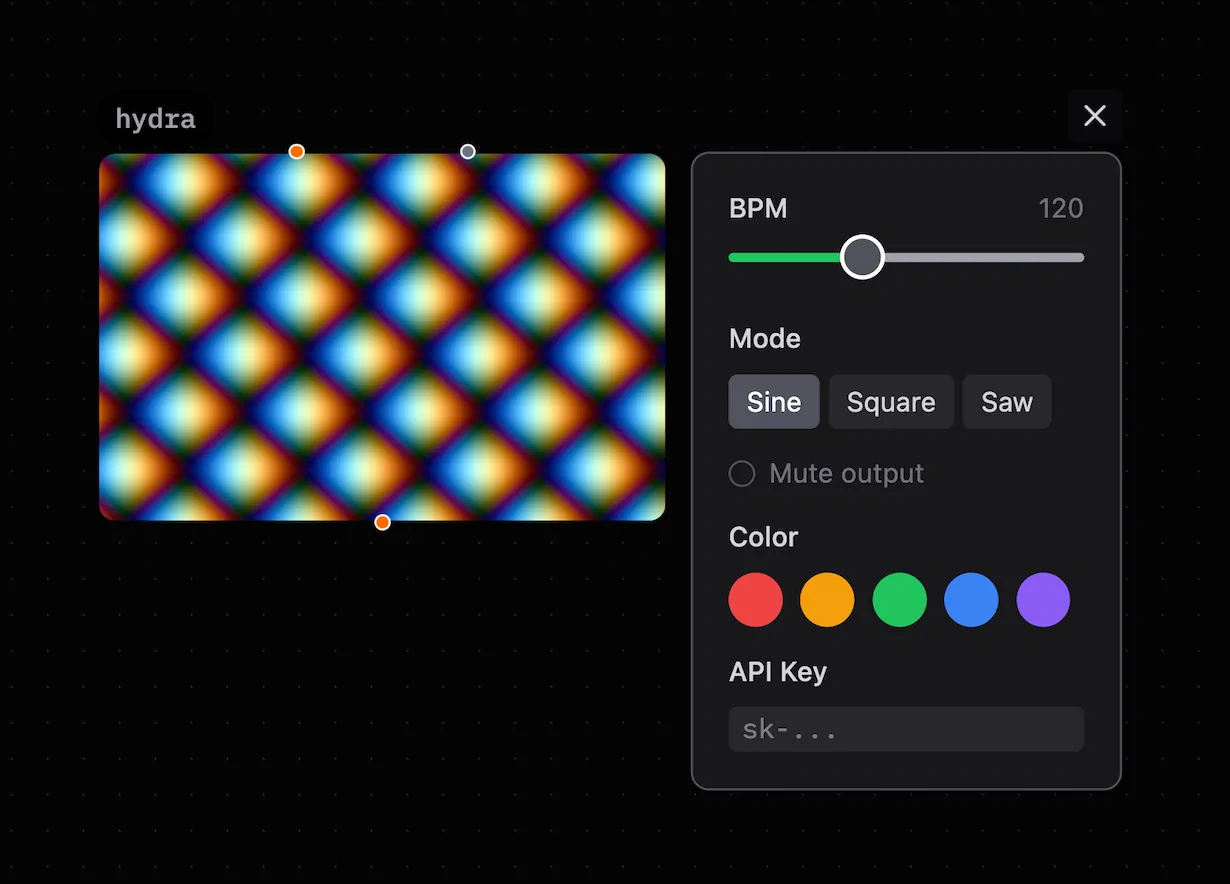
The panel shows the controls defined in the settings schema.
Supported Objects
Use settings in these objects:
- js, worker, and p5
- canvas, canvas.dom, textmode, and textmode.dom
- three, three.dom, pixi, and pixi.dom
- hydra, regl, swgl, dom, and vue
- tone~, sonic~, and elem~
Basic Usage
await settings.define([
  { key: 'speed', type: 'slider', label: 'Speed', min: 0, max: 10, default: 1 },
  { key: 'color', type: 'color', label: 'Color', default: '#ff6600' },
  { key: 'mode', type: 'select', label: 'Mode', default: 'loop',
    options: [
      { label: 'Loop', value: 'loop' },
      { label: 'Ping-pong', value: 'pingpong' },
      { label: 'Once', value: 'once' }
    ]
  }
]);

// Read values synchronously after define() resolves
const speed = settings.get('speed');
const color = settings.get('color');
define() is asynchronous. It loads saved values before it resolves. Always await it before you call get().
API Reference
settings.define(schema)
Define the settings schema. This function opens the settings panel. It returns a Promise after it loads saved values.
Call this function once at the top level of the code. Running the code again defines the schema again.
settings.get(key)
Get the current field value. This function is synchronous after define() resolves.
const opacity = settings.get('opacity'); // number
const label = settings.get('label');     // string
const active = settings.get('active');   // boolean
settings.getAll()
Get all current values in a plain object.
const { speed, color, mode } = settings.getAll();
settings.set(key, value)
Set a value from code. The field persistence setting saves the new value. Registered onChange callbacks run, and the panel updates immediately.
settings.set('gain', 0.8);
settings.set('mode', 'loop');
Use this function to update settings from received messages or internal values:
recv((msg) => {
  settings.set('gain', msg.value);
});
settings.onChange(callback)
Register a callback that runs when a value changes. The change can come from the panel or a settings.set() call.
settings.onChange((key, value, allValues) => {
  console.log(key, value);     // changed field
  console.log(allValues);      // all current values
});
Registering onChange marks the object as active with a green border. Patchies clears callbacks when the code runs again. Register the callback each time the code runs.
settings.clear()
Reset all settings to their default values. Clear saved values.
Field Types
slider
Use a range slider. min and max are required.
{ key: 'speed', type: 'slider', label: 'Speed', min: 0, max: 5, step: 0.1, default: 1 }
| Property | Type | Description |
|---|---|---|
min |
number | Minimum value (required) |
max |
number | Maximum value (required) |
step |
number | Step increment (default: 1) |
default |
number | Initial value |
number
Use a numeric input field.
{ key: 'count', type: 'number', label: 'Count', min: 1, max: 100, default: 10 }
| Property | Type | Description |
|---|---|---|
min |
number | Minimum value |
max |
number | Maximum value |
step |
number | Step increment |
default |
number | Initial value |
boolean
Use a toggle switch.
{ key: 'loop', type: 'boolean', label: 'Loop', default: true }
string
Use a text input.
{ key: 'label', type: 'string', label: 'Label', placeholder: 'Enter text...', default: 'Hello' }
select
Use a select menu with predefined options.
{
  key: 'shape',
  type: 'select',
  label: 'Shape',
  default: 'circle',
  options: [
    { label: 'Circle', value: 'circle' },
    { label: 'Square', value: 'square' },
    { label: 'Triangle', value: 'triangle', description: 'Three-sided polygon' }
  ]
}
You can also use a plain string array. Each string becomes the label and value:
{ key: 'shape', type: 'select', label: 'Shape', default: 'circle',
  options: ['circle', 'square', 'triangle'] }
An option description appears as a tooltip. Use the object form to add it.
color
Use a color picker. The value is a hex string, such as '#ff6600'.
{ key: 'bg', type: 'color', label: 'Background', default: '#000000' }
Use presets to show a swatch grid above the picker:
{
  key: 'palette',
  type: 'color',
  label: 'Color',
  default: '#ff0000',
  presets: ['#ff0000', '#00ff00', '#0000ff', '#ffff00']
}
json
Store JSON data without adding a control to the settings panel. Use it for state that belongs to the node, such as a sequencer grid or saved drawing data.
await settings.define([
  {
    key: 'grid',
    type: 'json',
    default: [
      [false, false, false, false],
      [false, false, false, false]
    ]
  }
]);

const grid = settings.get('grid');
grid[0][1] = true;
settings.set('grid', grid); // Persist an updated snapshot
JSON fields accept null, booleans, finite numbers, strings, arrays, and plain objects.
They reject values that cannot round-trip through a patch file, including undefined,
functions, Date, Map, Set, and circular references. get(), getAll(), and
onChange() return snapshots, so mutate a value and pass it back to set() to save it.
json fields use the same node, kv, and none persistence modes as other fields.
They do not use label, description, or visibleWhen, and a JSON-only schema does not
show a settings gear.
Common Field Properties
All field types use these properties:
| Property | Type | Description |
|---|---|---|
key |
string | Unique identifier, used with settings.get(key) |
label |
string | Display name shown in the panel; not used by json |
type |
string | Field type: slider, number, boolean, string, select, color, json |
description |
string | Optional tooltip shown on the label |
default |
any | Default value; a JSON value for json |
persistence |
string | Where to store the value (see below) |
Persistence
Use the persistence field property to control where Patchies stores values:
| Value | Behavior |
|---|---|
'node' |
Saved in the patch file — exported with the patch (default) |
'kv' |
Saved in local IndexedDB — persists across sessions but not exported |
'none' |
In-memory only — resets on page reload |
settings.define([
  // Saved with patch — shared when you export or share the link
  { key: 'speed', type: 'slider', label: 'Speed', min: 0, max: 10, default: 1 },

  // Local only — your personal preference, not exported
  { key: 'theme', type: 'select', label: 'Theme', persistence: 'kv',
    options: [{ label: 'Dark', value: 'dark' }, { label: 'Light', value: 'light' }]
  },

  // Ephemeral — resets each session
  { key: 'debug', type: 'boolean', label: 'Debug mode', persistence: 'none', default: false }
]);
Reacting to Changes
Use onChange to update visuals or behavior when the user changes a setting:
await settings.define([
  { key: 'hue', type: 'slider', label: 'Hue', min: 0, max: 360, default: 180 },
  { key: 'speed', type: 'slider', label: 'Speed', min: 0.1, max: 5, default: 1 }
]);

let hue = settings.get('hue');
let speed = settings.get('speed');

settings.onChange((key, value) => {
  if (key === 'hue') hue = value;
  if (key === 'speed') speed = value;
});

function draw() {
  background(`hsl(${hue}, 80%, 10%)`);
  // ...
}
Examples
Canvas — Parameter animation
await settings.define([
  { key: 'count', type: 'slider', label: 'Circle count', min: 1, max: 50, default: 12 },
  { key: 'color', type: 'color', label: 'Color', default: '#4488ff' },
  { key: 'speed', type: 'slider', label: 'Speed', min: 0.1, max: 5, default: 1, step: 0.1 }
]);

let { count, color, speed } = settings.getAll();

settings.onChange((_, __, all) => { ({ count, color, speed } = all); });

function draw(ts) {
  ctx.clearRect(0, 0, width, height);
  ctx.fillStyle = color;

  for (let i = 0; i < count; i++) {
    const angle = (i / count) * Math.PI * 2 + (ts * 0.001 * speed);
    const x = width / 2 + Math.cos(angle) * 150;
    const y = height / 2 + Math.sin(angle) * 150;
    ctx.beginPath();
    ctx.arc(x, y, 10, 0, Math.PI * 2);
    ctx.fill();
  }

  requestAnimationFrame(draw);
}

requestAnimationFrame(draw);
Hydra — Adjustable shader
await settings.define([
  { key: 'freq', type: 'slider', label: 'Frequency', min: 1, max: 60, default: 10 },
  { key: 'sync', type: 'slider', label: 'Sync', min: 0, max: 1, step: 0.01, default: 0.1 }
]);

let freq = settings.get('freq');
let sync = settings.get('sync');
settings.onChange((k, v) => { if (k === 'freq') freq = v; if (k === 'sync') sync = v; });

osc(() => freq, () => sync, 0.8).rotate(0.1).out();
Worker — Message-driven live configuration
await settings.define([
  { key: 'interval', type: 'number', label: 'Interval (ms)', min: 50, max: 5000, default: 500 },
  { key: 'enabled', type: 'boolean', label: 'Active', default: true }
]);

let interval = settings.get('interval');
let enabled = settings.get('enabled');
let timerId = null;

function startTimer() {
  if (timerId !== null) clearInterval(timerId);
  timerId = setInterval(() => {
    if (enabled) send(Date.now());
  }, interval);
}

settings.onChange((key, value) => {
  if (key === 'interval') { interval = value; startTimer(); }
  if (key === 'enabled') enabled = value;
});

startTimer();
JS — Update settings from incoming messages
await settings.define([
  { key: 'gain', type: 'slider', label: 'Gain', min: 0, max: 1, step: 0.01, default: 0.5 },
  { key: 'mode', type: 'select', label: 'Mode', default: 'sine',
    options: [{ label: 'Sine', value: 'sine' }, { label: 'Square', value: 'square' }]
  }
]);

// Settings panel can be controlled from messages
recv((msg) => {
  if (msg.gain !== undefined) settings.set('gain', msg.gain);
  if (msg.mode !== undefined) settings.set('mode', msg.mode);
});

// Or from the clock
clock.every('4:0:0', () => {
  settings.set('gain', Math.random());
});
Make Settings the Primary Button
After you define a settings panel, the gear icon is in the overflow menu by default. The <code> icon is in the rightmost slot.
For a code-stable patch, use setPrimaryButton('settings') to make the gear icon the primary button.
After this code runs, the gear icon is the primary button. Edit code moves to the overflow menu. See JS Integrations for the full setPrimaryButton() reference.
For glsl, use the comment directive instead:
// @primaryButton settings
Notes
- Call
define()at the top level of the code. Do not call it in a callback or loop. Running the code again resets the schema. - The settings panel appears only after
define()receives a non-empty schema. An empty schema does not show a gear icon. - If you do not call
define(), Patchies does not show a gear icon. - Revert All appears when a field has a
defaultand a different current value. Click it to restore every field default.
See Also
- JavaScript Runner — Use the full JSRunner API.
- Data Storage — Store general key-value data.
- Canvas Interaction — Handle pointer and keyboard events in visual objects.